 Objective
To add a carrier adjuster to a claim in ClaimWizard from the Insurer & Policy area.
Steps
- Open the claim you want to update.
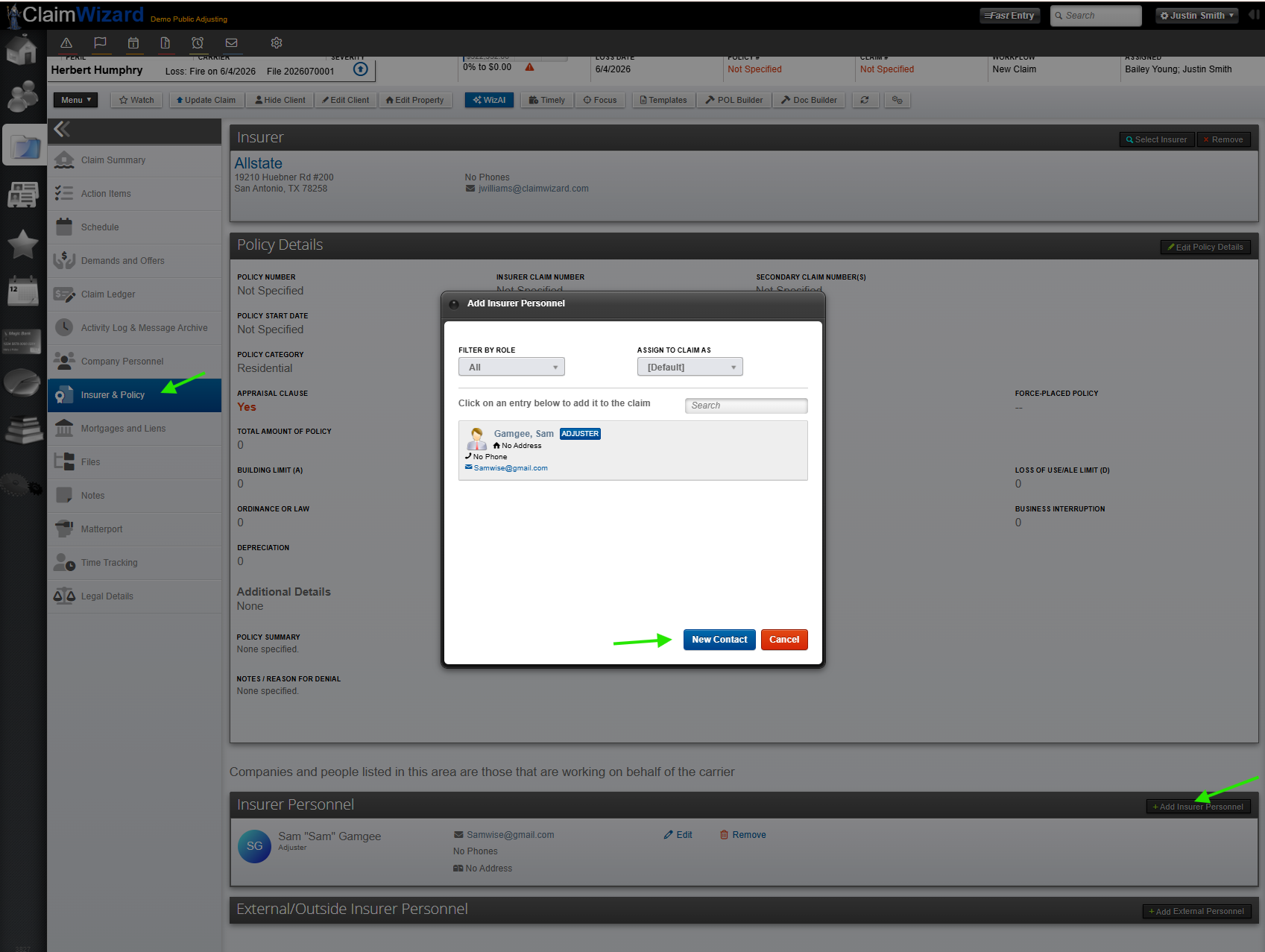
- In the left navigation, click Insurer & Policy.
- Scroll to the Insurer Personnel section.
- Click + Add Insurer Personnel.
- In the Add Insurer Personnel window, locate the adjuster.
- If needed, use Filter by Role to narrow the list to adjusters.
- Click the adjuster’s name to add them to the claim.
- If the adjuster is not already in the system, click New Contact and enter their information.
- Confirm the adjuster appears in the Insurer Personnel list.
- Use Edit or Remove later if the carrier contact changes.
Cautionary Notes
- Make sure you are adding the adjuster under the correct carrier and claim.
- If the adjuster is new, verify contact details before saving.
- Only assign the role that best matches their function on the claim.
Tips for Efficiency
- Use the role filter to find adjusters faster.
- Keep carrier personnel records up to date to reduce duplicate contacts.
- Add the adjuster as soon as you receive the carrier assignment to keep the claim current.