The Date Notified field records when your firm reported the loss to the carrier. It appears on the claim so anyone working the file can see it without searching notes or email.
Before you start
The claim record must already exist. You cannot set this date during claim creation.
Steps
- Open the claim.
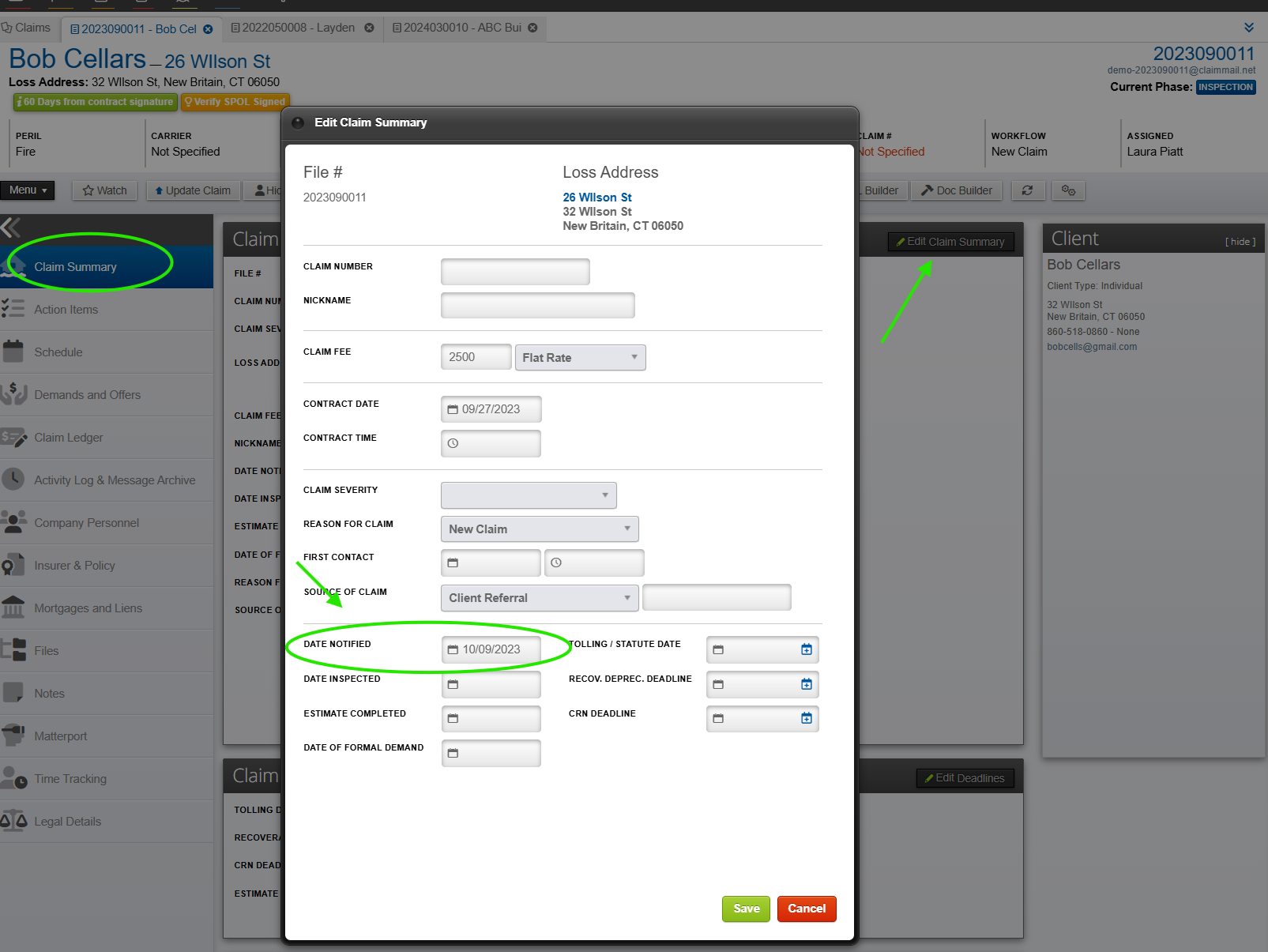
- In the left menu, click Claim Summary.
- Click Edit Claim Summary.
- In the Date Notified field, enter the date you notified the carrier.
- Click Save.
What happens next
The date appears on the Claim Summary panel and is visible to everyone on your team who can open the claim. ClaimWizard stores the date and does not calculate any deadline from it.
If it does not work
You do not see the Edit Claim Summary button. Your security level does not allow editing the claim summary. An Executive or Office Manager at your firm can check your account settings.
The date did not save. Closing the dialog or clicking Cancel discards the entry. Reopen Edit Claim Summary, enter the date again, and click Save.
You are looking for a different date. The Edit Claim Summary dialog also holds Tolling / Statute Date, Recov. Deprec. Deadline, and CRN Deadline. Those fields are also reachable from Edit Deadlines on the claim page. Date Notified is only for the date you reported the loss to the carrier.